Sparse-Frame Video Dubbing in InfiniteTalk
How Infinite Talk AI goes beyond mouth-only dubbing to deliver full-frame, audio-synchronized performances.
If you just want a practical, non-technical guide for using this engine to turn a single image into a talking video, see our tutorial on how to make a photo talk with AI.
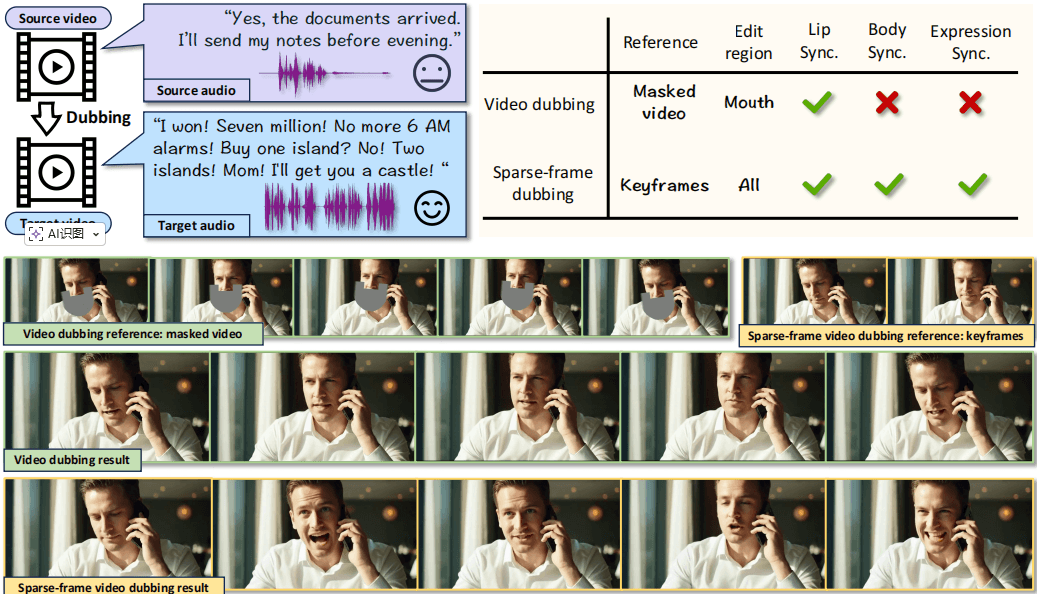
Figure 1: : Compared to the traditional paradigm, sparse-frame video dubbing will not only edit mouth regions. It gives the model freedom to generate audio aligned mouth, facial, and body movements while referencing on sparse keyframes to preserve identity, emotional cadence, and iconic gestures.
1. Why mouth-only dubbing is not enough
Most "video dubbing" systems today only edit a tiny region around the mouth.
They inpaint lips to roughly match the new audio, but everything else stays frozen:
- Head barely moves.
- Eyebrows and micro-expressions don't react to emphasis.
- The body posture and hands ignore the speech rhythm.
- Camera motion from the original clip is kept, but the performance feels disconnected from the voice.
This creates the classic "talking sticker" effect:
- The voice may sound energetic, but the face and body remain stiff.
- Emotional beats in the script don't line up with visible changes in expression or pose.
- Over longer clips, the mismatch becomes increasingly distracting and breaks immersion.
For short memes, this can be acceptable.
For dubbed interviews, explainers, learning content, or character-driven stories, it's not.
Our goal with Infinite Talk AI is to make the entire frame respond to the new audio — not just the lips.
2. What is sparse-frame video dubbing?
Sparse-frame video dubbing is a new paradigm introduced by the InfiniteTalk research.
Instead of editing every frame or only inpainting the mouth, we:
- Select a sparse set of keyframes from the original video, and
- Use those keyframes as high-level anchors, while
- Letting the model freely generate all in-between frames in sync with the new audio.
These keyframes act as control points for:
- Identity — who the person is (face structure, hairstyle, clothing).
- Emotional cadence — where the original performance speeds up, slows down, or hits strong emotional beats.
- Iconic gestures — recognisable hand movements or poses that define the scene.
- Camera trajectory — framing, zoom, and rough camera path across the shot.
The model then generates the full dubbed video such that:
- Lips, face, head, and body are driven by the new speech.
- Keyframes ensure the actor still looks like themselves and stays consistent across time.
- The camera still feels like the original shot, not a completely new recording.
3. How Infinite Talk AI implements sparse-frame dubbing
Sparse-frame video dubbing in Infinite Talk AI is powered by the InfiniteTalk architecture — a streaming, audio-driven video generator.
3.1 Keyframe selection
From the input video, InfiniteTalk samples a set of keyframes at perceptually important moments.
These frames are encoded as reference images and serve as anchors for:
- Facial identity and style
- Clothing and background
- Global camera movement
- Emotional rhythm from the original footage
The rest of the frames are not copied — they are regenerated in a way that respects both:
- The new audio, and
- The constraints implied by the keyframes.
3.2 Audio-driven full-frame generation
InfiniteTalk is trained to take:
- The dubbed audio track
- The selected keyframes (image references)
- A context window of recent frames (for motion continuity)
and to output the next chunk of video in latent space.
Instead of only modifying a mouth patch, it generates the entire frame:
- Lips form correct visemes for the spoken phonemes.
- Jaw, cheeks, and eyes move in sync with emphasis.
- Head turns, tilts, and nods follow the speech rhythm.
- Shoulders, torso, and upper-body posture react naturally over time.
3.3 Context frames for long sequences
To handle long clips, InfiniteTalk operates in overlapping chunks with context frames:
- Each new chunk sees a short history of frames from the previous chunk.
- This transfers motion momentum forward, so gestures and head movement continue smoothly.
- Combined with keyframes, this lets the model maintain both:
- Long-term identity and camera consistency.
- Short-term motion coherence and audio alignment.
4. Why we don't just use audio-driven I2V
A natural question:
"Can't we just plug the audio into a generic image-to-video (I2V) model and call it dubbing?"
The InfiniteTalk paper shows why this fails in practice:
Plain I2V with audio
- Starts from a single reference frame and rolls forward.
- Over long sequences, identity drifts: the face subtly changes, colors shift, backgrounds morph.
- Motion can become unstable and jittery.
First–Last-frame-constrained I2V
- Forces the model to strictly match both the first and last frame of each chunk.
- Prevents identity drift, but makes motion rigid.
- The model simply "copies poses" from the constraints instead of acting out the audio.
Sparse-frame video dubbing with InfiniteTalk is designed specifically to avoid this trade-off:
- Keyframes are soft constraints: they keep identity and scene style stable…
- …while the generator remains free to animate the full body in sync with the new speech.
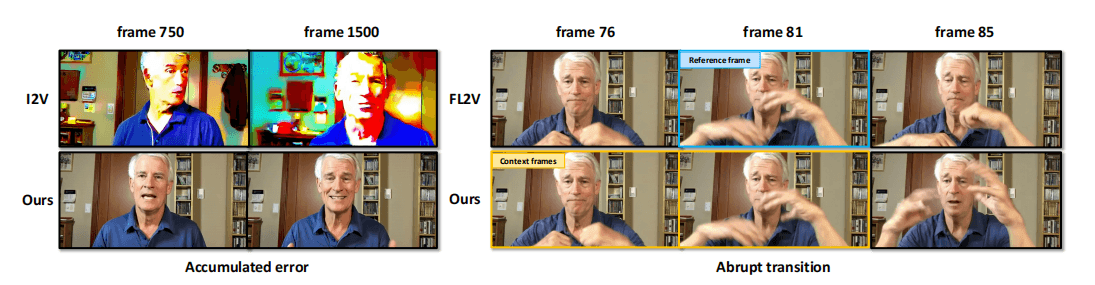
Figure 2: (left): I2V model accumulates error for long video sequences. (right): A new chunk starts from frame 82. FL2V model suffers from abrupt inter-chunk transitions.
5. What sparse-frame dubbing gives you in practice
From a creator's perspective, sparse-frame video dubbing translates to a few concrete benefits.
5.1 Natural, full-frame performances
- Actors don't just "open and close their mouths" — their whole body participates in the performance.
- Emotional beats in the script are visible as:
- Stronger head movements
- Shifts in posture
- Changes in facial expression
- Result: dubbed content feels acted, not just lip-edited.
5.2 Identity-stable across long videos
Because keyframes encode the original actor and style:
- The same character stays consistent across minutes, not just a couple of seconds.
- Clothing, hair, and lighting match the source footage.
- Camera framing and motion feel like the original shoot, even when the audio is completely different.
5.3 Scales to episodes and series
The streaming nature of InfiniteTalk means:
- You can process long segments (e.g. up to 600 seconds per pass) and stitch them seamlessly.
- Overlapping context windows ensure motion continuity between chunks.
- Sparse keyframes keep identity locked even when you generate chapter-length or episode-length content.
This makes Infinite Talk AI suitable for:
- Multi-language localization of series and interviews
- Long-form educational and training content
- Serialized storytelling and character-driven channels
6. When should you use sparse-frame dubbing?
Use sparse-frame video dubbing whenever:
- The performance matters more than just "the lips match"
- Viewers need to stay immersed for more than a few seconds
- Characters or hosts appear repeatedly across episodes
Typical use cases:
- Dubbing YouTube explainers and talking-head channels into multiple languages
- Revoicing corporate trainings, lectures, and webinars
- Turning static studio interviews into multilingual, globally localised content
- Creating character-consistent avatars that appear across many scenes and scripts
For very short clips or quick memes, mouth-only tools may be enough.
For anything longer, sparse-frame video dubbing is what keeps your dubbed content watchable.
7. Summary
- Mouth-only dubbing edits a small patch around the lips and leaves the rest of the frame frozen.
- Sparse-frame video dubbing instead:
- Keeps a small set of keyframes from the original video,
- Uses them to anchor identity, emotion, gestures, and camera, and
- Lets InfiniteTalk generate the full frame in sync with the new audio.
In Infinite Talk AI, this design is what allows you to:
- Dub long videos while keeping characters stable,
- Make the whole frame react to speech,
- And deliver performances that feel natural rather than mechanical.